
Download KhaataPro Billing Software for PC
Manage GST billing, inventory, sales, and business reports with one powerful desktop software. Built for retailers, wholesalers, distributors, and growing businesses.
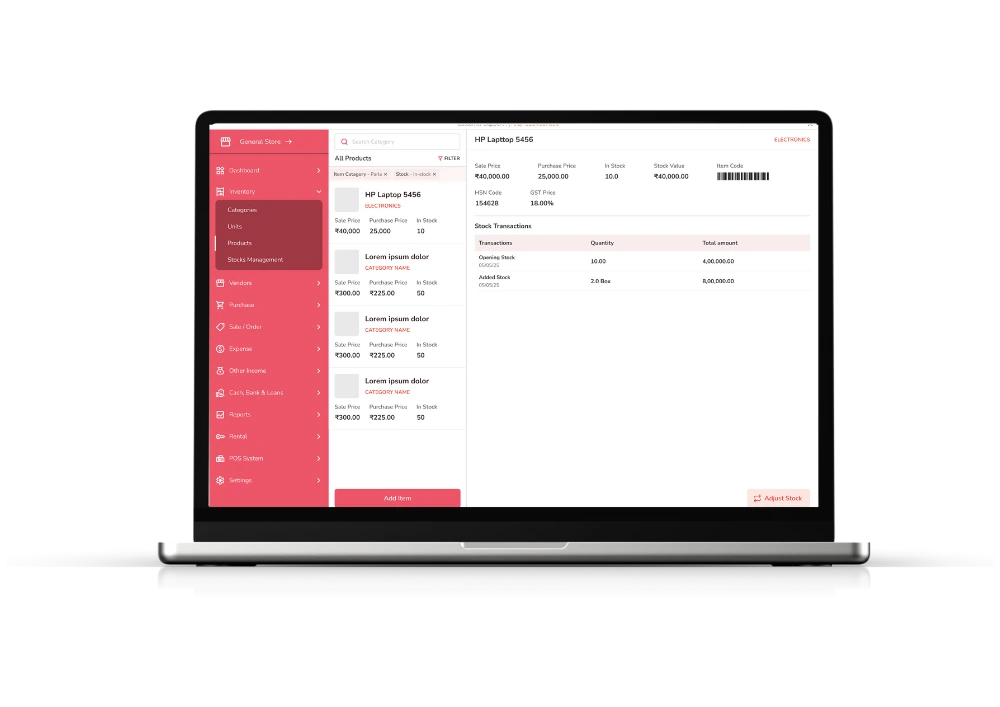
Smart Billing & Inventory Software
KhaataPro Billing Software for PC is an all-in-one business management solution that helps businesses create professional invoices, manage inventory, track purchases, monitor sales, and generate detailed reports. Instead of relying on manual billing or spreadsheets, businesses can automate daily operations and improve efficiency.
Whether you run a retail store, grocery shop, electronics business, restaurant, pharmacy, or wholesale company, KhaataPro provides everything needed to manage your operations from a single platform.
KhaataPro डेस्कटॉप वापरायला सुरुवात करा
आमचा डेस्कटॉप अॅप डाउनलोड करा आणि तुमचे व्यवसायाचे वित्त सहजपणे सांभाळा
विंडोज
सिस्टम आवश्यकता
- Windows 10 किंवा नंतरचे
- 2.0 GHz ड्युअल-कोर प्रोसेसर किंवा त्याहून अधिक
- किमान 4 GB RAM (8 GB शिफारस केलेले)
- 200 MB मोकळी डिस्क स्पेस
इन्स्टॉलेशन सूचना
- वर दिलेल्या बटणावरून इंस्टॉलर डाउनलोड करा
- डाउनलोड केलेली .exe फाईल चालवा
- इन्स्टॉलेशन पूर्ण करण्यासाठी स्क्रीनवरील सूचना पाळा
- डेस्कटॉप किंवा स्टार्ट मेन्यूमधून KhaataPro उघडा
मॅक ओएस
सिस्टम आवश्यकता
- macOS 11 (Big Sur) किंवा नंतरचे
- Intel किंवा Apple Silicon प्रोसेसर
- किमान 4 GB RAM (8 GB शिफारस केलेले)
- 200 MB मोकळी डिस्क स्पेस
इन्स्टॉलेशन सूचना
- वर दिलेल्या बटणावरून .dmg फाईल डाउनलोड करा
- डाउनलोड केलेली .dmg फाईल उघडा
- KhaataPro तुमच्या Applications फोल्डरमध्ये ड्रॅग करा
- Applications फोल्डर किंवा Launchpad मधून KhaataPro उघडा
इंस्टॉलेशन दरम्यान तुम्हाला काही अडचण आली तर कृपया आमच्या सपोर्ट टीमशी support@khaatapro.com वर संपर्क साधा. support@khaatapro.com
Features Overview
KhaataPro combines multiple business functions into one easy to use application.
Billing
- GST Billing
- Tax Invoices
- Quotations
- Credit Notes
Inventory
- Stock Management
- Barcode Support
- Low Stock Alerts
- Product Management
Sales
- Sales Entry
- Customer Billing
- Payment Tracking
- Daily Sales Reports
Purchases
- Purchase Entry
- Supplier Management
- Purchase Reports
- Stock Updates
Customer Management
- Customer Database
- Credit Management
- Outstanding Tracking
- Purchase History
Reports
- Sales Reports
- GST Reports
- Inventory Reports
- Profit & Loss Reports
- Business Analytics
How to Download & Install KhaataPro Billing Software
Getting started with KhaataPro is simple and takes just a few minutes. Follow these steps to download, install, and set up the software on your PC.
Step 1: Click the "Download Now" Button
Visit the KhaataPro Desktop page and click the Download Now button as per your Device.
Step 2: Save the Setup File
Once the download starts, save the setup file to a convenient location on your computer, such as your Downloads folder or Desktop, so you can easily access it.
Step 3: Run the Installer
Locate the downloaded setup file and double click it to launch the installer. Follow the on screen instructions to begin the installation process.
Step 4: Complete the Installation
The installation wizard will automatically install the required files on your computer. After the process is complete, click Finish to launch KhaataPro.
Step 5: Create Your Account
Open the software and create an account by providing the required details and verifying your information.
Step 6: Set Up Your Business
Enter your business details, add products or services, configure GST settings and import or create your inventory. Once the setup is complete, you can start generating invoices, managing stock, tracking sales and purchases, and monitoring your business from one platform.
डेस्कटॉप अॅप संबंधित प्रश्न
KhaataPro डेस्कटॉप अनुभवाबद्दल सर्वसाधारण प्रश्नांची उत्तरे
होय, खाताप्रो डेस्कटॉप सॉफ्टवेअर डाउनलोड आणि इन्स्टॉल करण्यासाठी मोफत आहे. इंस्टॉलेशननंतर तुम्हाला 15 दिवसांचा मोफत ट्रायल मिळतो. ट्रायल कालावधी संपल्यानंतर KhaataPro वापरणे सुरू ठेवण्यासाठी सबस्क्रिप्शन खरेदी करणे आवश्यक आहे.
खाताप्रो बहुतेक सिस्टमवर काम करते. Windows साठी Windows 10 किंवा त्यावरील आवृत्ती आणि Mac साठी macOS 11 किंवा त्यावरील आवृत्ती आवश्यक आहे. सुरळीत वापरासाठी किमान 4 GB RAM ची शिफारस केली जाते—उच्च श्रेणीच्या सिस्टमची गरज नाही.
नाही. खाताप्रो हे आयटी तज्ञांसाठी नव्हे तर व्यवसाय मालकांसाठी डिझाइन केलेले आहे. इंस्टॉलेशन आणि सेटअप प्रक्रिया सोपी, मार्गदर्शित आणि वापरकर्ता-अनुकूल आहे.
होय. तुमच्या सबस्क्रिप्शन प्लॅननुसार तुम्ही एकाच लॉगिन क्रेडेन्शियल्सने Windows आणि Mac दोन्हीवर तुमचे खाताप्रो खाते वापरू शकता.
मर्यादित इंटरनेट अॅक्सेस असतानाही खाताप्रो मधून बिलिंग करता येते. मात्र सॉफ्टवेअर अपडेट्स आणि तुमचा डेटा क्लाऊडवर सिंक करण्यासाठी इंटरनेट कनेक्शन आवश्यक आहे.
होय, तुम्ही खाताप्रो अनेक उपकरणांवर इन्स्टॉल करू शकता. प्रत्येक डिव्हाइससाठी संबंधित सबस्क्रिप्शन लायसन्स आवश्यक असतो जेणेकरून तो तुमच्या योजनेशी सुसंगत राहील.